Control Panel Test
- Connect positive lead of an ohmmeter to connector "Bl" in control panel connector. See Fig 1
. Leave lead connected to connector "Bl" throughout testing procedure. Press "VENT" mode button in and touch second ohmmeter lead, in turn, to terminal Nos. 2 and 7. There should be continuity at both terminals.
- Press in "HI-LO" mode button. Touch second ohmmeter lead, in turn, to terminals No. 3 and 4. Continuity should exist at both. Press in "HEAT" mode button. Touch second ohmmeter lead, in turn, to terminal Nos. 4 and 5. Continuity should be present at both.
- Press in "H/DEF" mode button. Touch second ohmmeter lead, in turn, to terminals No. 5 and 6. There should be continuity at both terminals. Press in "DEF" mode button. Touch second ohmmeter lead, in turn, to terminals No. 5 and 7. Continuity should exist at both.
- DO NOT press in "REC" button. Touch second ohmmeter lead to terminal No. 8. There should be continuity.
- In steps 1) through 4) continuity should exist only at terminals indicated. Replace control panel if it did not perform test as indicated.
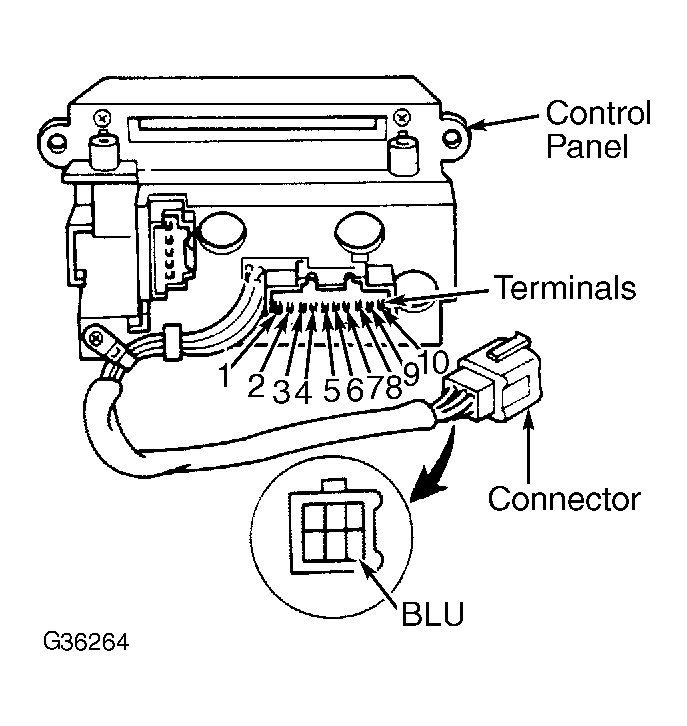 Courtesy of AMERICAN HONDA MOTOR CO., INC.